The version 4.0 was being developed by us and tested by a community of beta-testers for all 2008 year. And now we are happy to present you the final release of USB Safely Remove 4.0! It contains about dozen of new significant changes, some of them are:
- Hiding drives of empty card reader slots!
- Ability to eject card reader memory cards
- Drive letter management
- Prohibit assigning specified letters to hot-plug drives
- Supports any kind of hot-plug device, including PCMCIA
- Snappy scanning of locking processes
- Stopping via "disabling"
- Multimonitor support
- Vista UAC as well as Windows 64 bit support
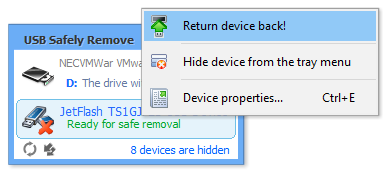
- "Return device back!" feature
Hiding drives of empty card reader slots!
Most of the card readers create a drive letter for every slot even if it doesn't contain a memory card. Those who uses only one or two memory cards at the same time, might dislike this behaviour. The new version allows you to get rid of this problem - you will see only those drives of the card reader where memory cards are connected.Before enabling of "hiding"


Ability to eject card reader memory cards
After you safely removed a card reader, you need to reconnect it (physically or using "Return device back!" feature), in order to get it read memory cards. USB Safely Remove 4.0 allows you to eject only required memory card, the card reader can work with other memory cards with its replug.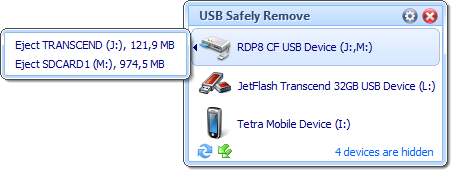
Drive letter management
Now you can change a drive letter of a USB device directly from the program. Moreover, you can change a volume label, or mount device as a folder of a fixed drive.
Stops any kind of hot-swap devices
The new version can see and stop such devices like PCMCIA. Also it has a unique feature to stop even those hot-swap devices whose drivers does not support "authentic safe removal" (they cannot be seen in the native Windows Safe Removal tool), e.g. Silicon Image SATA devices. USB Safely Remove stops these devices via "disabling" (as Windows Device Manager do), however it makes stopping of these devices convenient for user - in the same manner as you do ordinary safe removal.
Exploring a device drive in an alternative file manager
In the program options you can choose a way of exploring a device's drive - using Windows Explorer, or using your favourite file manager, ie Total Commander.
Mount point support
Do you know that you can mount your USB storage devices as a folder of a fixed drive, not only as a drive letter? Despite this feature is supported by Windows starting from NT4 version, it's not used actively by Windows users, because it's deeply hidden (therewith, native safe removal doesn't support this feature fully).USB Safely Remove 4.0 allows you to mount your USB storages as folders of a fixed drive, as well as fully supports these devices safe removal.

"Return device back!" feature
After you stopped a device, but still did not unplug it, sometimes it would be very useful to return it back to the system. For example if you have remembered you forgot to write a file to the drive after you stopped it. In this case you are compelled to physically replug the device. However sometimes it is quite inconvenient, e.g. if the device is connected to the rear panel of the computer.USB Safely Remove allows you to return your device back as easy as you do safe removal - in a one click!