NEWS

Welcome to WordPress. This is your first post. Edit or delete it, then start blogging!Lorem ipsum dolor sit amet, consectetuer adipiscing elit. Quisque sed felis. Aliquam sit amet felis. Mauris semper, velit semper laoreet dictum, quam diam dictum urna, nec placerat elit nisl in quam. Etiam augue pede, molestie eget, ...

TIPS AND TRICK

Lorem ipsum dolor sit amet, consectetuer adipiscing elit. Quisque sed felis. Aliquam sit amet felis. Mauris semper, velit semper laoreet dictum, quam diam dictum urna, nec placerat elit nisl in quam. Etiam augue pede, molestie eget, rhoncus at, convallis ut, eros. Aliquam pharetra. Nulla in tellus eget odio sagittis blandit. ...

SOFTWARE

Here's an mp3 file that was uploaded as an attachment: Juan Manuel Fangio by Yue And here's a link to an external mp3 file: Acclimate by General Fuzz Both are CC licensed. Lorem ipsum dolor sit amet, consectetuer adipiscing elit. Quisque sed felis. Aliquam sit amet felis. Mauris semper, velit semper laoreet dictum, ...

GAME

Some block quote tests: Here's a one line quote. This part isn't quoted. Here's a much longer quote: Lorem ipsum dolor sit amet, consectetuer adipiscing elit. In dapibus. In pretium pede. Donec molestie facilisis ante. Ut a turpis ut ipsum pellentesque tincidunt. Morbi blandit sapien in mauris. Nulla lectus lorem, varius aliquet, ...

Contributor post, approved

I'm just a lowly contributor. My posts must be approved by the editor.Mauris semper, velit semper laoreet dictum, quam diam dictum urna, nec placerat elit nisl in quam. Etiam augue pede, molestie eget, rhoncus at, convallis ut, eros. Aliquam pharetra. Nulla in tellus eget odio sagittis blandit. Maecenas at ...

Posted by Sweet Misery - - 0 comments

Whenever user connect a Windows Mobile device to Windows Vista Windows Mobile Device Center (WMDC) via a USB cable, WMDC fails to connect to the Pocket PC (PPC) Phone device, causing synchronization not start or fail. Sometimes, WMDC may tries to connect to mobile device with “Connecting” message for a while, but eventually fails with “Disconnected” message. In some worse case, Windows Vista doesn’t detect any Windows Mobile device been connected, and no response or connect attempt action in WMDC.

In Device Manager, Windows Mobile-based device driver under Portable Devices and Microsoft Mobile Device Remote Adapter local area network connection under Network Adapters appear briefly before missing or disappearing again. Any connection established is terminated, dropped, disconnected, vanished and disappeared within a few seconds. When the connection is not established, user cannot or unable to sync the PC with desktop, and can’t install applications or transfer files. Soft reset or hard reset the device also does not help to perfectly fix the problem.

Microsoft publishes several troubleshooting tips to fix device unable to connec issue. One of the cause appears to be Windows Live OneCare that blocks the device connectivity. To allow the device to connect via Windows Live OneCare, enable (check) the ActiveSync/Windows Mobile Device Center – synchronize my mobile devices with my computer rule in Firewall Connection Tool button (Firewall tab) of Windows Live OneCare settings. Also in Firewall Tab, click on Advanced button and go to Ports and Protocols tab. Add and create a port called Windows Mobile Device Center with TCP Port Range as 5721, For Connections dropdown as Inbound [local ports] and Scope is set to Local network (subnet).

Other possible cause in failure to connect to WMDC is due to driver installation may not have completed successfully. If you think this may be the case, follow these steps:

  1. Keep the WM device connected.
  2. Go to Start > Start Search.
  3. Enter Device Manager or devmgmt.msc to launch the Device Manager window.
  4. Look under the Network adapters node for Microsoft Windows Mobile Remote Adapter. If this is not present, skip to step 5. Otherwise, right-click Microsoft Windows Mobile Remote Adapter and choose to Uninstall.
  5. Look under the Mobile Devices node for Microsoft USB Sync. If this is not present, skip to step 6. Otherwise, right-click Microsoft USB Sync and choose to Uninstall.
  6. Disconnect and reconnect the WM device. The device driver for the PPC Phone will re-install and Windows Mobile Device Center will launch.

If Microsoft resolution doesn’t help, try to disable the Advanced Network Functionality mode on the Windows Mobile device from the USB to PC icon in Connections of Start Menu Settings. After turning off Advanced Network Functionality, the device will be connected via a USB Serial driver, the sync will be done via native Smartphone USB Sync device driver and no LAN network connection is made.

However, the most likely and most possible resolution for dropped connection and not connected problem for Windows Mobile Device Center is related to Windows Media Player process. On connection with a Windows Mobile device, system will launch wmplayer.exe process, even though Windows Media Player is not ran or opened, and user is not syncing any music, song or media files at internal memory storage or SD memory card.

The wmplayer.exe process for unknown reason will terminate the connection, according to experience of a few users. As wmplayer.exe process won’t terminate itself, user have to end and kill the process as fast as possible once the Pocket PC device is connected to computer and wmplayer.exe process service is launched.

To manually terminate the wmplayer.exe, right click on Windows Taskbar and click on Task Manager. Then click on Image Name to sort the list of processes according to name alphabetically. Locate and highlight wmplayer.exe near the bottom of the list, and click on End Process button. After a while, the device will install with correct driver, connect and WMDC will sync. If the device still doesn’t connect and sync, try to disconnect and reconnect the device again, and kill off any wmplayer.exe service that run after connecting as soon as possible.

If system is not responding to or takes no action to detect, install connect any plugged in Windows Mobile device (and of course WMDC no sync action too), it may be causing by existing wmplayer.exe already existed, blocking future sync process. To fix the issue, open Task Manager (taskmgr in Start Search), and search for any wmplayer.exe service that is running, and kill or end all these processes. Re-connect the Windows Mobile device, and Windows Mobile Device Center should connect and sync properly.
[ Read More ]

Posted by Sweet Misery - - 0 comments

Intel introduced the 36-bit physical addressing mode called PAE (Physical Address Extension, read Wikipedia reference or MSDN reference) since Intel Pentium Pro processor to allow 32-bit operating systems to use more than 4 GB of physical memory. However, even with x86 or x86-x64 PAE supported CPU processor, in most Windows system, PAE is disabled by default, and user has to manually turn on the PAE support in operating system in order to recognize and use more than 4 GB of physical RAM memory, with the exception of Windows Vista.

A lot of technical support and troubleshooting sites for Windows Vista publishes a tweak or tip that asking user to manually enable PAE support in 32-bit Windows Vista with the following command to use more than 4GB of memory.

BCDEdit /set PAE forceenable

According to MSDN Library article, “on a computer that supports hardware-enabled Data Execution Prevention (DEP) and is running a 32-bit version of the Windows operating system that supports DEP, PAE is automatically enabled when DEP is enabled (Data Execution Protection, DEP is enabled by default in Windows Vista) and, on all 32-bit versions of the Windows operating system, except Windows Server 2003 with SP1, PAE is disabled when you disable DEP. To enable PAE when DEP is disabled, you must enable PAE explicitly, by using /set nx AlwaysOff and /set pae ForceEnable.”

Thus, PAE mode is always enabled by default in Windows Vista as it’s required for hardware-based DEP / NX. And 32-bit client versions of Windows Vista (and also Windows XP) will never support more than a 4GB address spaces, even with PAE enabled, according to another MSDN Library article. Thus, 4 GB physical RAM memory limit on 32-bit Windows Vista is an artificial software based lock placed by Windows Vista operating system to limit the availability of the portion of memory larger than 4 gigabytes in a system with motherboard that support more than 4GB worth of physical address space.

Thus, many users disappointed and baffled that even though after ‘enabling’ PAE support in 32-bit (x86) Windows Vista (which in actuality is not necessary), they still cannot see full 4GB or more (most system showing only around 3.5 or 3.25 GB of memory due to some memory address space been mapped to use as reserve for system peripherals) of physical memory or RAM modules installed, although Windows Vista SP1 can correctly display the amount of installed memory (not memory available to use) up to 4GB in size.

Currently, the only known method to enable support for physical memory bigger than 4GB in size in Windows Vista 32-bit version is using the hack to replace the limitation files with copy from 32-bit Windows Server 2008, which supports and can see more than 4 GB memory. However, user using the hack has to deal with some consequences especially product activation issue, unless you have license or genuine product key for Windows Server 2008.

[ Read More ]

Posted by Sweet Misery - - 0 comments

When I first saw the default search pane in Windows XP, my instinct was to return it to its classic look; that puppy had to go. Of course, I later discovered that a doggie door is built into the applet. Click "Change preferences" then "Without an animated screen character." If you'd rather give it a bare-bones "Windows 2000" look and feel, fire up your Registry editor and navigate to:

HKEY_CURRENT_USER \ Software \ Microsoft \ Windows \ CurrentVersion \ Explorer \ CabinetState.

You may need to create a new string value labeled "Use Search Asst" and set it to "no".
[ Read More ]

Posted by Sweet Misery - - 0 comments

Theoretically, you can get rid of it (as well as a few other things). Windows 2000 power users should already be familiar with this tweak.

Fire up the Windows Explorer and navigate your way to the %SYSTEMROOT% \ INF folder. What the heck is that thingy with the percentage signs? It's a variable. For most people, %SYSTEMROOT% is C:\Windows. For others, it may be E:\WinXP. Get it? Okay, on with the hack! In the INF folder, open sysoc.inf (but not before making a BACKUP copy first). Before your eyes glaze over, look for the line containing "msmsgs" in it. Near the end of that particular line, you'll notice that the word "hide" is not so hidden. Go ahead and delete "hide" (so that the flanking commas are left sitting next to one another). Save the file and close it. Now, open the Add and Remove Programs applet in the Control Panel. Click the Add / Remove Windows Components icon. You should see "Windows Messenger" in that list. Remove the checkmark from its box, and you should be set. NOTE: there are other hidden system components in that sysoc.inf file, too. Remove "hide" and the subsequent programs at your own risk.
[ Read More ]

Posted by Sweet Misery - - 0 comments

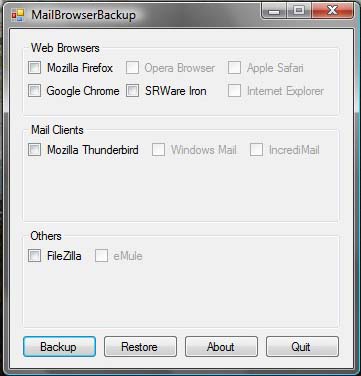
MailBrowserBackup is a simple utility for creating complete backups of Internet Explorer, Mozilla Firefox, Windows Mail, Mozilla Thunderbird, IncrediMail, Opera Browser, Apple Safari, Google Chrome, SRWare Iron, FileZilla FTP Client, eMule profiles.

mailbrowserbackup

At the moment, the MailBrowserBackup v.01 only supports Mozilla Firefox, Google Chrome, Filezilla and Mozilla Thunderbird. According to the author, this standalone and open-source programme will be upgraded to support other browsers such as Opera, Safari, and Internet Explorer, Windows Mail, Incredimail and eMule in their next coming release of MailBrowserBackup v.02

With MailBrowserBackup, users can backs up multiple web browsers profiles in seconds on any Windows pc that has Microsoft .NET 2.0+ or above. To download the free version of MailBrowserBackup, follow this link here.

[ Read More ]

Posted by Sweet Misery - - 0 comments

Fujitsu Laboratories of America, Inc. had recently introduced Xurch, a new Web search browser plug-in that makes Web searching faster and a lot easier. Searching the web is often a repetitive and tiring process. Most of the time, you enter a search term only to realize that your query was too general, resulting in too many unrelated results. With Xurch, the computer helps you build the search you need, making it easier to find precisely what you are looking for and steer away from those long unmanageable lists showing millions of results.

Fujitsu Xurch

Simply install the free beta version of Xurch plug-in into a Firefox or Internet Explorer browser, and a Xurch Cloud will appears when you perform searches on major search engines and popular websites. This Xurch Cloud box or tag cloud provides users with suggested words for refining their searches, allowing them to quickly iterate through several refinements and zero in on the exact information they are looking for. In addition to making it easier for users to find information when using popular search engines, Xurch’s search facilitation technology is also being customized for popular third-party websites, including news and shopping sites too.

xurch cloud

Xurch is not a search engine. It simply facilitates searches performed using popular search engines and websites. After performing a search, the Xurch Cloud will appears around the query box whenever the cursor is moved to the box, offering several possible query refinements, and by clicking on one of these suggestions, the new word is added to the query and the search is run again. The new results are displayed with a new set of suggestions for further refinement. For example, after searching for “notebook” which results in over a half million results, Xurch suggests “capacity,” “screen sizes,” “HD,” “reviews,” “applications” and more to make it easier to narrow down the search.

Currently, Xurch only supports Firefox running on Microsoft Windows, Mac OSX, and Linux. Xurch also supports Internet Explorer v6, v7, and v8. The beta version of the Xurch plug-in can be downloaded for free at www.xurch.com.

[ Read More ]

Posted by Sweet Misery - - 0 comments

Venom has unveiled a new range of alkaline batteries called Venom Power Eco Alkaline batteries. Venom Power is free of mercury, cadmium and lead, all harmful effects to human and the environment. Besides, the Venom battery has also been certified as carbon neutral by Carbonfund.org. They are the world’s first carbon neutral alkaline battery.

Venom Eco Alkaline Batteries

The Venom Power Eco Alkaline batteries were certified carbon neutral after a detailed product life-cycle assessment of carbon emissions. What is Carbon Neutral? Carbon neutral or zero carbon footprint refers to the achievement of a net zero carbon emission by balancing a measured amount of carbon released with an equivalent amount sequestered or offset. As part of the carbon neutral project, Venom is supporting Carbonfund.org and the Return to Forest Project which is helping to reforest Nicaragua’s Pacific coast.

The President of Venom Group International, Clint Bower said, “Today’s consumers are more aware of global warming and the environmental impact of the products they use every day. Consumers are choosing Earth-friendly, sustainable products or those that reduce environmental impact over traditional alternatives.”

The Venom Power batteries are recyclable and will be available in AA, AAA, C, D and 9V sizes. Beside their eco-responsible features, Venom claims that the batteries display high quality performance that can rival other leading alkaline battery brands. The batteries are targeted to be shipped to retailers throughout North America during the fourth quarter of this year.

[ Read More ]

Posted by Sweet Misery - - 0 comments

To cater particularly for professional such as musicians, reporters, etc, the award-winning audio recording specialists, Edirol, has introduced its professional and high quality portable recorder, R-09HR. R-09HR is a new leading member to Edirol’s R-series recorders. This high-definition audio recording device is able to capture 3D sound in high 24bit/96kHz sound quality. By incorporating the newly developed Isolated Adaptive Recording Circuit (I.A.R.C.), R-09 HR able to lower noise disruption during recording and improve the recoding quality.

The Eidrol R-09HR is designed as ultra-portable compact handheld audio recorder and it is easy to bring along on traveling. It features a user-friendly OLED graphic display to easy reading/monitoring the sound recording. It comes with a built-in preview speaker for instant playback of recorded sound, SD and SDHC memory card slots and a wireless remote controller. The R-09HR can be connected directly to PC via USB for importing or exporting audio files with a substantial high speed.

The high-resolution wave/MP3 recorder, R-09HR, is priced around USD520.

[ Read More ]

Posted by Sweet Misery - - 0 comments

Another breakthrough by Planon Systems Solutions with the introduction of their latest DocuPen Xtreme X-Series (models X05, X10 and X50) ultra high resolution, full page colour scanning pens with Bluetooth, for easy transfer to Blackberry, notebook, Windows Mobile smart phones and other mobile devices wirelessly.

PlanOn Scanner Pen

The Xtreme X series of scanning pen provides higher quality images, improved efficiency and functionality, as compared to their predecessor, the DocuPen 700 & 800 Series. The X05, for example, has maintained the small ‘Pen-sized’ profile but now bundles in a lot more with 200MHZ computer processor, 64 MB of fast SD Ram, with an optional microSD expansion slot, making it the fastest ever portable mobile scanners.

Planon DocuPen Xtreme XSeries Scanning Pens

The DocuPen X05 and X10 models allow scanning in monochrome and 24-bit color modes while the X50 has additional features including higher resolution and grey scale modes. All three models support USB 2.0 for data transfer and battery recharging. The improved and brighter OLED Screen Display (in all 3 models) also makes it easier to navigate the pens’ functions. Users can now select file names, date and time, battery and memory levels, color and mono modes as well as compression level.

PlanOn OLED Display

Another notable feature not available in previous DocuPen 800 series is the new Planon’s Crystal Line Contact Technology that provides extremely accurate imaging for near-precise reproductions of cheques, contracts, receipts, invoices, color pictures and more. All X-Series comes with a Lithium Polymer battery that is both lighter and longer lasting than Lithium Ion battery used in previous models.

Planon DocuPen X-Series

Overall, the DocuPen Xtreme X-Series lightweight scanning pen will definitely redefine the way professionals carry out their works. And if used together with Planon’s PrintStik portable printer for instant hardcopy printing, working will no longer be confined only in offices. Now, that’s true mobility.

DocuPen Xtreme X-Series scanning pens are currently retailing from $369.99 and are available for online purchase through official Planon Store.

[ Read More ]

Posted by Sweet Misery - - 0 comments


Amazon's Kindle 2
Amazon hopes to sell a million Kindles by the end of t

An Israeli hacker claims to have broken the copyright protection on Amazon's Kindle e-reader, reports say.

The hack will allow the ebooks stored on the reader to be transferred as pdf files to any other device.

The hacker, known as Labba, responded to a challenge posted on Israeli hacking forum, hacking.org.

It is the latest in a series of Digital Rights Management hacks, the most famous being the reverse engineering of iTunes.

The Kindle e-book reader has been very successful since it was launched in the US in 2007.

Amazon hopes to have sold a million devices by the end of the year.

It leaves it to individual publishers whether they want to apply DRM but books in its main proprietary format .azw, cannot be transferred to other devices.

It did not immediately respond to the news but it is likely it will attempt to patch its DRM software.

DRM has long divided opinion. While rights holders regard it as a crucial tool to protect copyright, consumers tend to hate it because it limits what can be done with content.

"DRM is not an effective way of preventing copying nor is it a good way of making sales. There isn't a customer out there saying 'what I need is an electronic book that does less," novelist and co-editor of the Boing Boing blog Cory Doctorow told the BBC when the Kindle was launched.

As soon as a new DRM system is active, hackers begin to try and break it.

Most famously Jon Lech Johansen, known as DVD Jon, cracked the copy protection on DVDs in 1999.

He went on to break the copyright protection on iTunes, leading Apple to offer DRM-free music.

DVD Jon now runs a company with an application to take the pain out of moving different types of content between devices.

source

[ Read More ]

Posted by Sweet Misery - - 0 comments

Word logo
Word 2003 and 2007 are the most common versions on the market

Microsoft has failed in its attempt to dismiss a court case that would stop it selling Word.

The software giant appealed against a ruling which found it infringed a patent owned by Canadian company i4i.

With the failure of the appeal Microsoft must now pay i4i damages of $290m (£182m) and comply with an injunction ending the sales of some versions of Word.

The injunction is scheduled to go into effect on 11 January.

Microsoft said the ban would prohibit the sale of all available versions of Microsoft Word and Microsoft Office software from the date that the injunction comes into force.

Versions of the software sold before that date, including Word 2003 and Word 2007, will not be hit by the ruling.

"We have been preparing for this possibility since the District Court issued its injunction in August 2009 and have put the wheels in motion to remove this little-used feature from these products," Microsoft said.

"Therefore, we expect to have copies of Microsoft Word 2007 and Office 2007, with this feature removed, available for US sale and distribution by the injunction date," it said.

"Beta versions of Microsoft Word 2010 and Microsoft Office 2010, which are available now for downloading, do not contain the technology covered by the injunction," Microsoft added.

Microsoft was accused by i4i of infringing on a 1998 XML patent in its Word 2003 and Word 2007 programs.

Word uses XML, or the Extensible Markup Language, to open .XML, .DOCX, and .DOCM files.

The initial ruling in the court dispute between i4i and Microsoft was made in August. At that time Microsoft was found to have infringed the i4i patent and the Canadian firm was awarded damages.

The injunction on sales was imposed at the same time but a Microsoft appeal initially overturned that ban on US sales. The stay on the injunction has now run out and, as a result, Microsoft must stop selling infringing versions of Word.

Microsoft said it might file further appeals, but that it was keen to comply with the injunction.

"While we are moving quickly to address the injunction issue, we are also considering our legal options," it said.


source: link

[ Read More ]

Posted by Sweet Misery - - 0 comments


Sony Electronics has launched the new Sony Ericsson Aino unlocked mobile phone in United States, which combines crisp 3″ touch screen, 8.1MP camera, traditional keypad, built-in aGPS, PlayStation 3 Remote Play, Media Home and Media Go features in a single device, including Stereo Bluetooth headphones MH-100, charging base EC-100 and 8GB microSD memory card in a package.

sony-ericsson-aino

Main Features Of Sony Ericsson Aino:

  • Stunning 3-inch 432 x 240 pixels touch screen display with an unique and interactive user interface
  • 8.1 megapixel camera with auto/touch focus, photo flash, image stabilization, Face Detection and BestPic technologies
  • Bluetooth 2.0 + EDR (Enhanced Data Rate) and Wi-Fi 802.11b/g connectivity
  • View the location where photos are taken thanks to Geo-Tag application and the pre-installed Google Maps application
  • Share and view photos between their phone, PC and even their TV with Aino’s wireless functionality
  • Clear Stereo technology reduces left and right channel leakage for superior stereo sound, while Clear Bass technology adds sharp, dynamic bass with minimal distortion
  • Seamlessly access music, videos and photos stored on PS3 at home as well as remotely control a PS3 using PlayStation 3 Remote Play
  • Wirelessly download content with an established Wi-Fi connection using Aino’s Media Home functionality, and organize media stored on PC and transfer it to Aino with Media Go application
  • Talk time: up to 13 hours ; Standby time: up to 380 hours
  • Dimensions: 104 x 50 x 15.5 mm ; Weight: 134 grams

Sony Ericsson Aino unlocked 3G-enabled handset is now available at Sony Style stores nationwide and SonyStyle.com for around $600.

[ Read More ]

Posted by Sweet Misery - - 0 comments

JAKARTA - Sun Microsystems provides software Solaris Cluster 3.2 11/09, Solaris-based platform Operating System (OS) with high accessibility, cost effective and the most innovative.

Solaris Cluster last issued, allowing the increased use of integrated virtualization features and the cost of the Solaris OS, making it easier for customers to run Oracle E-Business Suite, Siebel CRM 8, Single Instance Oracle Database and Oracle Real Application Clusters (RAC) in the Solaris Container.

This tool provides options for greater consolidation of disaster recovery solutions and high accessibility of continuous with Oracle database applications.

"Customers using the Solaris Cluster technology to save costs by optimizing the use of compute resources, consolidate databases and multi-tier applications are also benefiting from cost savings and reliability, accessibility and service capabilities sustainable system better," said Jim McHugh, Vice President Marketing Datacenter , Sun Microsystems through its official statement on Saturday (12/19/2009).

McHugh added, customers can reduce software licensing costs, expenses and cost of system management hardware, and gain greater investment protection with support for more than ten years for each version of Solaris Cluster product.

Solaris Cluster can be used and adapted to the various software components, networks, storage and servers, providing accessibility and ecosystem complete disaster recovery. Juxtaposed with the Solaris OS, Solaris software Cluster 3.2 11/09 expand accessibility and virtualization features of Solaris into a global disaster recovery solution, presents more quickly notice the damage and minimal application downtime in the event of damage.

New release extends support for the Oracle Automatic Storage Management (ASM) with Oracle RAC database to integrate Oracle databases into various types of use Solaris Container. This comprehensive integration utilizing kemudahaan ASM usage and performance in a virtual environment that is easily accessible, while providing cost effective solutions.

Solaris Cluster participated in the Olympic and Paralympic Winter Games 2010 to be held in Vancouver, Canada. Sun Canada helps Organizing Committee Olympic and Paralympic Vancouver 2010 Winter Games (VANOC) to the Information Dissemination System / Information Diffusion Systems (ISD) developed by his Atos Origin to support the recording of game time, printing the results match, authentication signature match with the referee and then distribution of game results to the media to be conveyed to the public. (srn)
[ Read More ]

Posted by Sweet Misery - - 0 comments


CALIFORNIA - A number of Twitter users had complained about the difficulty of accessing the site mikroblogging, twitter some time ago. The reason, an Iranian hackers could mess up the front yard Twitter.

But, the manager Twitter have restored the site from hacker attacks, so Twitter can be re-accessed. Down his site that was founded in March 2006 is now trending topic. Thus was launched Cnet, Friday (12/18/2009).

Iranian hacker could write a message that reads:

Iranian Cyber Army
THIS SITE HAS BEEN HACKED BY CYBER Iranian Army
iRANiAN.CYBER.ARMY @ GMAIL.COM

U.S.A. They think Controlling And Managing By Their Internet Access, But They Do, We Control And Manage Internet By Our Power, So Do Not Try To Stimulation Iranian Peoples To ....

NOW IN WHICH COUNTRY LIST embargo? IRAN? USA?

WE PUSH THEM IN embargo LIST
Take Care.

Security problems are a concern Twitter. Twitter users often become the main target of cyber criminals to steal information. Additionally, Twitter is also often the target of phishing via a message with a link in it that led to the Twitter login page, where the page is actually false, and can steal user passwords. (Ugo)
[ Read More ]

Posted by Sweet Misery - - 0 comments

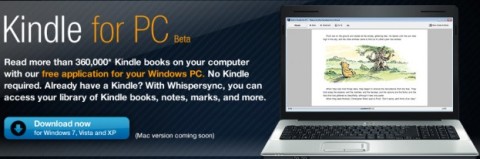
The well-known e-commerce site and IT provider, Amazon.com Inc. has launched its new Kindle for PC free application (Beta), which allows users to read over 360,000 Kindle books on their computer, without the need of Kindle e-Reader device, providing users a best reading experience available on their PC.

kindle-for-pc

Highlights of Kindle for PC:

  • Search and browse over 360,000 books including 101 of 112 New York Times Best Sellers
  • Get free book samples (first chapter) before you buy
  • Access your library of Kindle books, notes, marks and more thanks to Whispersync
  • Choose from over 10 different font sizes and adjust words per line
  • Compatible with Windows XP Service Pack 2 or later, Windows Vista and Windows 7
  • Zoom in and out of text with a pinch of the fingers, and turn pages with finger swipe utilizing Windows Touch technology (Windows 7)

The new Kindle for PC application for Windows PC is now available as a free download at Amazon (aff) . According to Amazon, Mac version of Kindle for PC app is coming soon!
[ Read More ]

Posted by Sweet Misery - - 0 comments

Microsoft Office Excel (or simply Microsoft Excel) allows user to protect specific worksheet and the contents of locked cells with a password so that the data is not deliberately edit, or accidentally change, move and delete. Without a password, user unable to modify or make any changes to the protected elements in the worksheets.

Note that this protect worksheet password is not the same with workbook-level password security, which prevent the workbook from opening without a valid password authentication.

Microsoft doesn’t provide a way to directly change the password for worksheet protection. So in order to change the Protect Sheet password, a workaround trick has to be done.

In order to change the Protect Sheet password, if you know the existing password, just unprotect the sheet using the password. Then, protect the worksheet again with a new password. And, the worksheet is not protected with new password.

[ Read More ]

Posted by Sweet Misery - - 0 comments

In Microsoft Office Excel (including Excel 2003 and Excel 2007), user can easily create another duplicate copy of worksheet that has the exactly identical contents and data from the original sheet. Creating another copy of worksheet is useful if user want to try out new formula, calculation, font, format or other changes, and don’t want to risk messing up the original version, or want to be able to quickly revert to original worksheet when anything goes wrong.


To create another exact identical copy of worksheet, press and hold Ctrl key, then click on the tab of the sheet that want to create a copy and drag the cursor in the form of tab with plus sign to the left or right past the original tab location of the spreadsheet or workbook (if the tab location is already far left or far right, you can only drag it to the right or left respectively). The new location user drop the tab-cursor will be the location of the new duplicate worksheet tab.

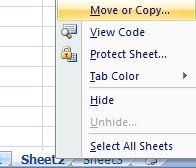
Alternatively, right click on the tab of worksheet to duplicate, the select Move or Copy.

Move or Copy Excel Worksheet

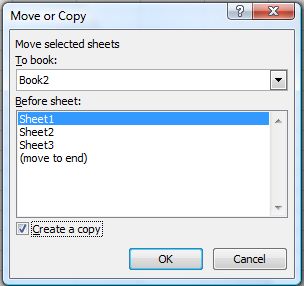
Then, on “Move or Copy” dialog box, tick the check box for Create a Copy, and select the location of the new tab for the exactly duplicated worksheet. User can even create the new copy of sheet in another workbook. Click OK when done.

Create a Copy of Excel Sheet

[ Read More ]

Posted by Sweet Misery - - 0 comments

The Windows 7 manager provides utilities to optimize and cleanup Windows 7. You can tweak your OS to improve speed or system security.

Windows 7 Manager

Windows 7 Manager

This software tool puts together over 30 different utilities into one location for systematic use. There are seven categories that organize the tools: Information, Optimizer, Cleaner, Customization, Security, Network and Miscellaneous Utilities.

The installation process begins as follows:

Save the File on the local directory for installation

Save the File on the local directory for installation

The setup manager is next.

Setup Manager to Orient the software on the PC

Setup Manager to Orient the software on the PC

The license agreement.

Agree to License Agreement

Agree to License Agreement

Identify the Installation Folder

Pick the location of the Installation Folder

Pick the location of the Installation Folder

Ready to Install

All Options are Selected You are Ready To Install the Software

All Options are Selected You are Ready To Install the Software

Install process

Installing Windows7 Manager Process

Installing Windows7 Manager Process

Software registration

Software Unregistred

Software Unregistred

Create the Restore Point

System Restore Point

System Restore Point

Creating the system restore point.

Create the System Restore Point

Create the System Restore Point

System Restore Point created

System Restore Point Created

System Restore Point Created

Windows 7 Manager

Windows 7 Manager Installed

Windows 7 Manager Installed

The Optimization tab

Optimization feature with tools

Optimization feature with tools

The Cleaner tab

The Cleaner Tab

The Cleaner Tab

Customization feature

Customization

Customization

Security for Windows 7

Security for Windows

Security for Windows

The Network Tools

Network Tools

Network Tools

Miscellaneous Tools

Miscellaneous Utilities

Miscellaneous Utilities

The downloaded version comes in a 16 day trial version or in a purchase and register version.

Download from: http://www.yamicsoft.com/windows7manager/index.html

[ Read More ]

Posted by Sweet Misery - - 0 comments

Handy Shortcuts is a Windows7 download tool that you can use to create desktop shortcuts for many Windows actions. The installation is simple following the download. Running the executable will produce:

Handy ShortCuts

Handy ShortCuts

To create a shortcut, all you have to do is click the Create link.

Lock WorkStation

Lock WorkStation

There are 10 Short cuts that you can create in the basic tab.

  • Lock your Windows
  • Switch User Accounts
  • Shutdown Windows
  • Restart Windows
  • Log Off Windows
  • Hibernate Windows
  • Desktop Shortcut
  • Add and Remove Program Short Cut on Desktop
  • Open Device Manager
  • Launch Windows Security Center
Handy Shortcuts on the Desktop

Handy Shortcuts on the Desktop

In the Advanced Tab, you also can create 10 shortcuts.

Handy ShortCuts - The Advanced Tab

Handy ShortCuts - The Advanced Tab

Download from: http://www.softpedia.com/get/Desktop-Enhancements/Other-Desktop-Enhancements/Handy-Shortcuts.shtml

[ Read More ]

Posted by Sweet Misery - - 0 comments

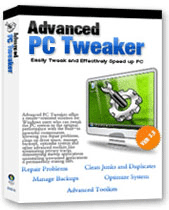
Most Windows PCs will exhibit a certain degree of slowness after some period of usage (about 2 years or so). Other symptoms of “aged PC” are pop-up mysterious error messages, ActiveX or similar .dll errors and blue screen, system crashing or system freezing from time to time. Well, you can now say goodbye to those problems with Advanced PC Tweaker – a complete package for your PC care and maintenance that will safely clean and repair the registry problems and speed up your computer with a few simple clicks so your PC will always stays in the pink of health.

Advanced PC Tweaker

Key Features and Benefits:

  • 1-Click Maintenance
  • Clean Invalid Registry Entities
  • Repair Registry Errors
  • Repair Windows system Errors
  • Repair/Restore Internet Explorer
  • Block ActiveX Objects
  • Register ActiveX Objects
  • Clean up Junk Files
  • Indentify and Clean up Duplicate Files
  • Manage Registry Backups
  • Utilize System Restore Point
  • Tweak Memory Management
  • Optimize System Settings
  • Set Settings for Optimal Performance
  • Allow Perform Scheduled Task
  • Remove Tracks of Internet Activities
  • Administer Startup Applications
  • Uninstall Unneeded Applications
  • Permanently Remove Files or Folder
  • Submit PC Problems to Solutions Center
  • Unlimited Free Technical Support
  • Automatically Updated during the Subscribed Period

advanced-pc-tweaker-main-interface

Advanced PC Tweaker (APT) is fully compatible with all major Windows based systems, including the latest Windows Vista, Windows XP/ 2003/ 2000 and even Windows 98 and ME. With Advanced PC Tweaker you can repair your registry problems with only several clicks.

Errors Utility scans and fixes the commonly-known Windows problems, protecting your Windows system from crashing, freezing and blue screen problem. Advanced PC Tweaker also includes Internet BHO (Internet Browser Helper Objects) manager and IE Restore utilities to ensure a much safer internet experience by blocking malicious plug-ins and restore Internet Explorer to tip top performing states. Apart from cleaning and fixing hardcore registry, APT helps you to scan and clean up junk files or duplicate files from your system, providing more space on your hard drives and allow applications to run faster and more efficiently.

advanced-pc-tweaker-duplicate-cleaner

Solve Problems & Speed up:

  • Windows© Installer Errors
  • ActiveX Errors
  • ActiveX Control Object Problems
  • Windows© Startup Errors
  • Windows© Explorer Errors
  • Windows© Media Player Errors
  • Svchost.exe & other exe Errors
  • Windows© Operating System Problems
  • Scan & Fix Registry-Related Errors
  • Prevents PC from Freezing or Crashing
  • DLL Errors
  • Runtime Errors
  • IExplore and System32 Errors
  • System Crashes, Blue Screen
  • Chkdsk Issues
  • Computer Freezing
  • Internet Explorer Errors
  • Javascript Errors
  • Dr Watson Errors
  • Driver Errors
  • Task Manager Related Issues
  • Computer & Application Shutdown
  • Prevent Application Crashes
  • Load Windows© Faster
  • Run Applications Smoothly

With Advanced PC Tweaker, you will be able to manage your personal computer’s registry and backups system setting while optimizing the system performance with System Optimizer and Memory Tweaker by disabling some unnecessary applications or services under certain environment – all these without causing any system instability. Coupled with some other built-in advanced toolkits such as the Evidence Cleaner, Startup Manager, Uninstall Manager and File Shredder, you can be sure that your PC will be kept healthy in its best form ever.

Download it free from Advanced PC Tweaker.

[ Read More ]

Posted by Sweet Misery - - 0 comments

Windows 7 is the latest version of Microsoft Windows. Many of us may want to upgrade their old version of Windows to Windows 7. Upgrading to a new operating system is not simple but can be rather messy and time consuming. You need to find all your data, files and user settings, and save them into a storage folder in order to do the upgrading.

Easy Transfer Ccable

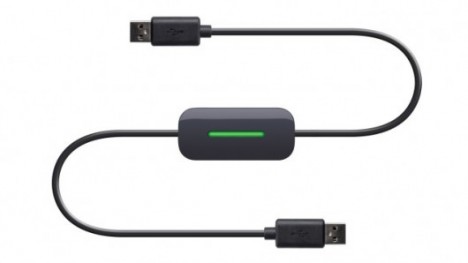
Belkin, the global specialist and manufacturer in connectivity devices, has announced its new Easy Transfer Cable for Windows 7 recently. The cable is designed to simplify the transfer process with no interruption. It provides a fast and easy solution to migrate all of your files (music, photo, movies, documents, etc), folders, user accounts, email messages and more automatically from your Windows XP or Windows Vista computer to a new Windows 7 computer. A post-migration comprehensive report will be provided to show all transferred data, programs and settings.

The setup is just in 3 easy steps: install software, connect the USB 2.0 cable to two computers (one end is a computer running either Windows XP or Vista and the other end’ in a computer running Windows 7), and follow on-screen prompts. Belkin’s Easy Transfer Cable is designed to work with the Windows Easy Transfer utility from Microsoft.

The Easy Transfer Cable for Windows 7 will be available at $39.99 in North America and scheduled to hit Europe and Asia on the first quarter of 2010.

[ Read More ]

Posted by Sweet Misery - - 0 comments

Windows Memory Diagnostic (WMD) is a RAM tester that scans, tests, verifies and determines the Random Access Memory (RAM) on the computer
for errors or problems due failing or faulty physical RAM or memory system hardware. The diagnostic includes a comprehensive set of memory tests, yet it’s easy to use and fast.

Windows Memory Diagnostic has to be run from either a 3.5-inch floppy disk or a CD disc. Microsoft, the utility provider, has a documentation for the utility, but it’s not necessary to go through the long details. Here’s the brief guide on how to set up Windows Memory Diagnostic on a 3.5-inch floppy disk or CD-ROM, and then run memory test.

1. Download the Windows Memory Diagnostic setup installer mtinst.exe.
2. Run the mtinst.exe start Windows Memory Diagnostic Setup.
3. Click either one of the two options:
1. Create Startup Disk to install Windows Memory Diagnostic to instantly write the RAM tester on a floppy disk.
2. Save CD Image to Disk if you want to create a CD-ROM that you can use to start your computer.
4. If you select to create a Startup floppy disk, insert a formatted floppy disk into floppy drive, and then select the floppy disk drive from the list provided. Finally, click Create. When the installation is complete, the Success dialog box will appear.

If you choose to save CD image, select a location where you want to save the ISO-9660 image and then click Save. When the file has been saved, the Success dialog box will appear. Then burn the ISO image to a blank CD disc.
5. Turn off the PC.
6. Remove all RAM memory module except one stick.
7. Restart the computer.
8. Insert the Windows Memory Diagnostic installed floppy disk or CD into floppy drive or CD/DVD-ROM drive.
9. Ensure that the boot sequence in motherboard BIOS is set to boot from floppy disk drive or CD-ROM or DVD-ROM first, instead of hard disk drive.
10. Windows Memory Diagnostic loads and its interface appears. After loading, the first test pass begins and continues until complete, unless you pause or exit Windows Memory Diagnostic. Once the first test pass consisting a series of 6 tests is complete, WMD will report if it manages to find another error or fault. If no error, Successful will be shown.

If there is failure, the piece of memory module is likely faulty. User can try to turn off the computer, and then reseat the memory module on its slot, or move it to another slot, and run the test again. It’s also possible to press T key to run extended and thorough test.
11. If no problem found, hit X key to exit from the test.
12. Insert another piece of RAM module (you may or may not want to remove the previously tested module, but if you not removing it or them, the newly inserted piece will be the culprit if any error found).
13. Restart the computer with RAM memory test floppy disk or CD inserted, and repeat the testing process again.
[ Read More ]

Posted by Sweet Misery - - 0 comments

Intel introduced the 36-bit physical addressing mode called PAE (Physical Address Extension, read Wikipedia reference or MSDN reference) since Intel Pentium Pro processor to allow 32-bit operating systems to use more than 4 GB of physical memory. However, even with x86 or x86-x64 PAE supported CPU processor, in most Windows system, PAE is disabled by default, and user has to manually turn on the PAE support in operating system in order to recognize and use more than 4 GB of physical RAM memory, with the exception of Windows Vista.

A lot of technical support and troubleshooting sites for Windows Vista publishes a tweak or tip that asking user to manually enable PAE support in 32-bit Windows Vista with the following command to use more than 4GB of memory.

BCDEdit /set PAE forceenable

According to MSDN Library article, “on a computer that supports hardware-enabled Data Execution Prevention (DEP) and is running a 32-bit version of the Windows operating system that supports DEP, PAE is automatically enabled when DEP is enabled (Data Execution Protection, DEP is enabled by default in Windows Vista) and, on all 32-bit versions of the Windows operating system, except Windows Server 2003 with SP1, PAE is disabled when you disable DEP. To enable PAE when DEP is disabled, you must enable PAE explicitly, by using /set nx AlwaysOff and /set pae ForceEnable.”

Thus, PAE mode is always enabled by default in Windows Vista as it’s required for hardware-based DEP / NX. And 32-bit client versions of Windows Vista (and also Windows XP) will never support more than a 4GB address spaces, even with PAE enabled, according to another MSDN Library article. Thus, 4 GB physical RAM memory limit on 32-bit Windows Vista is an artificial software based lock placed by Windows Vista operating system to limit the availability of the portion of memory larger than 4 gigabytes in a system with motherboard that support more than 4GB worth of physical address space.

Thus, many users disappointed and baffled that even though after ‘enabling’ PAE support in 32-bit (x86) Windows Vista (which in actuality is not necessary), they still cannot see full 4GB or more (most system showing only around 3.5 or 3.25 GB of memory due to some memory address space been mapped to use as reserve for system peripherals) of physical memory or RAM modules installed, although Windows Vista SP1 can correctly display the amount of installed memory (not memory available to use) up to 4GB in size.

Currently, the only known method to enable support for physical memory bigger than 4GB in size in Windows Vista 32-bit version is using the hack to replace the limitation files with copy from 32-bit Windows Server 2008, which supports and can see more than 4 GB memory. However, user using the hack has to deal with some consequences especially product activation issue, unless you have license or genuine product key for Windows Server 2008.

[ Read More ]

Posted by Sweet Misery - - 0 comments

Working professionals in today’s fast-paced environment need mobility and speed in whatever they do, including documents scanning. That is why Fujitsu introduced a lightweight, mini and portable A4 duplex Automatic Document Feeder (ADF) scanner with colours – ScanSnap S300.

Fujitsu ScanSnap S300 Scanner

The ScanSnap S300, which weighs only 1.4kg in a compact dimension of 284mm x 95mm x 77mm, can easily scan up to 8 double-sided color pages (that’s 16 images) in one minute. For extra mobility, the ScanSnap S300 can be powered through your laptop or notebook’s USB port when AC power source is not within reach.

USB Powered Scanner Fujitsu ScanSnap S300

Unlike normal images scanner which save files as jpeg, the S300 quality scanner features a One Touch button that is capable of scanning both sides of the document at a single pass and saving it in keyword searchable PDF files, thus saving valuable time for future referencing.

Fujitsu ScanSnap S300 Scanner with ADF

The Fujitsu ScanSnap S300 comes with a host of automatic image correction features in ensuring great scanning results. Simply load a stack of documents into its feeder and press the one touch “SCAN” button. The S300 will automatically recognizes the size of each document, detects and corrects for skew, and shows images in their proper orientation with blank pages removed. And using the bundled software CardMinder v3.2, even business cards can be scanned and stored into Outlook or CSV (Excel) format, conveniently. A very smart scanner, indeed.

[ Read More ]

Posted by Sweet Misery - - 0 comments


Washington - Year 2009 is a blessing for Facebook and Twitter. How not, the site of this friendship reaches a turning point in the virtual world success throughout the year with a marked increase in number of users of the site.

Twitter, the service mikroblogging besutan Biz Stone was not released because of soaring popularnya more intelligent use of mobile phones in society, relying on the character of the site 140 desirable because it is simple and easy. Founded in March 2006, Twitter straight over a period of three years.

Besides Twitter, Facebook name of the most phenomenal course throughout 2009. Founded in 2004 by Mark Zuckeberg, this social networking site has a membership of more than 350 million. Not surprisingly, if Facebook can beat MySpace, owned by News Corp..

Even so phenomenal, if Facebook is a country, and its members are residents. So Facebook is the fourth largest country in the world.

"They are big winners. Facebook users increased to three times this year, while Twitter will continue to grow. In fact, I predict there will be an additional four million new members earlier this year, the site was close to the figure 40 million users," explained Son Keath, founder SocialFresh.com social media consultant based in North Carolina, as quoted Straits Times, Sunday (12/13/2009).

"But keep in mind, Facebook and Twitter explosion also extends to the various segments. That is, the two sites were not only used for companionship, but also as a means to create public opinion in the middle," he added.

Keath also added, in 2010 and later Facebook Twitter will continue to experience growth, while not going for now. Later, the two sites also the more widespread use as an instrument other than friendship and a business course, but could be more than that.
[ Read More ]

Posted by Sweet Misery - - 0 comments

TrekPay will quickly become your steady earnings machine!

Everytime you spend a few minutes using our service
increases your earnings until you are making $200 per month.

You will love TrekPay! (It's always Free and so Easy to Do!)

Spend a few minutes on TrekPay for something you already
do for free. Why?.........because now you can get paid for it!

If you need the money? This should be a no-brainer!

It's Free and Easy to do!


[ Read More ]

Posted by Sweet Misery - - 0 comments


LOS ANGELES - Social networking site MySpace has managed to seduce the owner imeem music streaming site worth $ 1 million. This step is one strategy of increasing the number of MySpace users.

In a blog posting on MySpace, Wednesday (12/9/2009), MySpace CEO Owen Van Natta said the deal would allow imeem to integrate music services on the MySpace site.

According to Van Natta, one of the shortcomings have MySpace is not the music streaming technology on mobile phones. With the merger imeem, these deficiencies have tertambal. imeem can strengthen streaming music application on the phone, either on the iPhone, and Google's Android-based phone.

"Within the next few weeks, we will seek an integrated imeem music on MySpace. It is expected that 16 million mobile phone users on imeem will move to a MySpace music," said Van Natta.

MySpace price for this purchase is approximately $ 1 million. This amount is at once an indication of how difficult it is free music business in cyberspace.

In May, Warner Music has pulled its investment in imeem is worth USD16 million. In fact, they are also released $ 4 million worth of royalties should be paid imeem.

Warner, EMI, Universal Music, and Sony Music are a number of music labels that participate in venture koint on MySpace. (srn)
[ Read More ]

Posted by Sweet Misery - - 0 comments


LIVERPOOL - renowned jewelry designers in the world, Stuart Hughes had buried hundreds of diamonds and change the iPod Touch become super expensive.

Launched through the official website on Tuesday (12/7/2009), Stuart Hughes transformed the iPod such a way that could give the impression of exclusivity and luxury to its owners. The back of the iPod with the material covered in 22 carat gold size 149 grams. Meanwhile, the Apple logo are pinned in the center filled with 53 diamonds VVS1 the mengkilau.

Not only that, 300 diamonds were pinned around the front edge of the iPhone. Whereas the other 12 were diamond circular navigation buttons adorn the iPhone, complete with a 2.1 carat diamond, pink, right in the middle.

This iPod can be the most expensive in the world. Because the iPod is designed by Katherine Hughes is valued approximately USD233.000. Packaging semewah was made possible, with a box made of bamboo with mengkilau view. The inside of the packaging Nappa covered with a cloth used to wrap a Porsche luxury mobile bench.

Previously, Stuart Hughes has ever made the iPhone a luxury that not less expensive. In addition to the iPod and iPhone, Stuart Hughes also conjure up other devices to become more exclusive and elegant, like a Nokia mobile phone, music player, and watch.

To complete the eksklusifitasnya, this iPod was made in a limited edition, only three fruits. (srn)
[ Read More ]