NEWS

Welcome to WordPress. This is your first post. Edit or delete it, then start blogging!Lorem ipsum dolor sit amet, consectetuer adipiscing elit. Quisque sed felis. Aliquam sit amet felis. Mauris semper, velit semper laoreet dictum, quam diam dictum urna, nec placerat elit nisl in quam. Etiam augue pede, molestie eget, ...

TIPS AND TRICK

Lorem ipsum dolor sit amet, consectetuer adipiscing elit. Quisque sed felis. Aliquam sit amet felis. Mauris semper, velit semper laoreet dictum, quam diam dictum urna, nec placerat elit nisl in quam. Etiam augue pede, molestie eget, rhoncus at, convallis ut, eros. Aliquam pharetra. Nulla in tellus eget odio sagittis blandit. ...

SOFTWARE

Here's an mp3 file that was uploaded as an attachment: Juan Manuel Fangio by Yue And here's a link to an external mp3 file: Acclimate by General Fuzz Both are CC licensed. Lorem ipsum dolor sit amet, consectetuer adipiscing elit. Quisque sed felis. Aliquam sit amet felis. Mauris semper, velit semper laoreet dictum, ...

GAME

Some block quote tests: Here's a one line quote. This part isn't quoted. Here's a much longer quote: Lorem ipsum dolor sit amet, consectetuer adipiscing elit. In dapibus. In pretium pede. Donec molestie facilisis ante. Ut a turpis ut ipsum pellentesque tincidunt. Morbi blandit sapien in mauris. Nulla lectus lorem, varius aliquet, ...

Contributor post, approved

I'm just a lowly contributor. My posts must be approved by the editor.Mauris semper, velit semper laoreet dictum, quam diam dictum urna, nec placerat elit nisl in quam. Etiam augue pede, molestie eget, rhoncus at, convallis ut, eros. Aliquam pharetra. Nulla in tellus eget odio sagittis blandit. Maecenas at ...

Posted by Sweet Misery - - 0 comments

In Microsoft Office Excel (including Excel 2003 and Excel 2007), user can easily create another duplicate copy of worksheet that has the exactly identical contents and data from the original sheet. Creating another copy of worksheet is useful if user want to try out new formula, calculation, font, format or other changes, and don’t want to risk messing up the original version, or want to be able to quickly revert to original worksheet when anything goes wrong.


To create another exact identical copy of worksheet, press and hold Ctrl key, then click on the tab of the sheet that want to create a copy and drag the cursor in the form of tab with plus sign to the left or right past the original tab location of the spreadsheet or workbook (if the tab location is already far left or far right, you can only drag it to the right or left respectively). The new location user drop the tab-cursor will be the location of the new duplicate worksheet tab.

Alternatively, right click on the tab of worksheet to duplicate, the select Move or Copy.
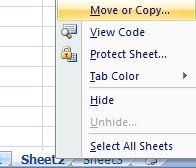
Move or Copy Excel Worksheet

Then, on “Move or Copy” dialog box, tick the check box for Create a Copy, and select the location of the new tab for the exactly duplicated worksheet. User can even create the new copy of sheet in another workbook. Click OK when done.
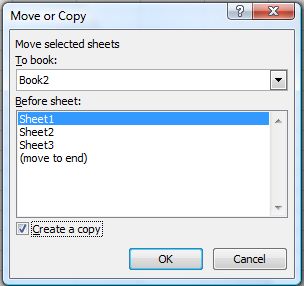
Create a Copy of Excel Sheet

Leave a Reply