NEWS

Welcome to WordPress. This is your first post. Edit or delete it, then start blogging!Lorem ipsum dolor sit amet, consectetuer adipiscing elit. Quisque sed felis. Aliquam sit amet felis. Mauris semper, velit semper laoreet dictum, quam diam dictum urna, nec placerat elit nisl in quam. Etiam augue pede, molestie eget, ...

TIPS AND TRICK

Lorem ipsum dolor sit amet, consectetuer adipiscing elit. Quisque sed felis. Aliquam sit amet felis. Mauris semper, velit semper laoreet dictum, quam diam dictum urna, nec placerat elit nisl in quam. Etiam augue pede, molestie eget, rhoncus at, convallis ut, eros. Aliquam pharetra. Nulla in tellus eget odio sagittis blandit. ...

SOFTWARE

Here's an mp3 file that was uploaded as an attachment: Juan Manuel Fangio by Yue And here's a link to an external mp3 file: Acclimate by General Fuzz Both are CC licensed. Lorem ipsum dolor sit amet, consectetuer adipiscing elit. Quisque sed felis. Aliquam sit amet felis. Mauris semper, velit semper laoreet dictum, ...

GAME

Some block quote tests: Here's a one line quote. This part isn't quoted. Here's a much longer quote: Lorem ipsum dolor sit amet, consectetuer adipiscing elit. In dapibus. In pretium pede. Donec molestie facilisis ante. Ut a turpis ut ipsum pellentesque tincidunt. Morbi blandit sapien in mauris. Nulla lectus lorem, varius aliquet, ...

Contributor post, approved

I'm just a lowly contributor. My posts must be approved by the editor.Mauris semper, velit semper laoreet dictum, quam diam dictum urna, nec placerat elit nisl in quam. Etiam augue pede, molestie eget, rhoncus at, convallis ut, eros. Aliquam pharetra. Nulla in tellus eget odio sagittis blandit. Maecenas at ...

Posted by Sweet Misery - - 0 comments

Windows 7 is the latest version of Microsoft Windows. Many of us may want to upgrade their old version of Windows to Windows 7. Upgrading to a new operating system is not simple but can be rather messy and time consuming. You need to find all your data, files and user settings, and save them into a storage folder in order to do the upgrading.
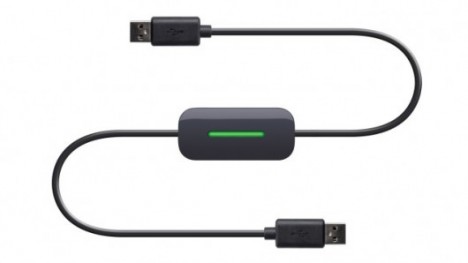
Easy Transfer Ccable

Belkin, the global specialist and manufacturer in connectivity devices, has announced its new Easy Transfer Cable for Windows 7 recently. The cable is designed to simplify the transfer process with no interruption. It provides a fast and easy solution to migrate all of your files (music, photo, movies, documents, etc), folders, user accounts, email messages and more automatically from your Windows XP or Windows Vista computer to a new Windows 7 computer. A post-migration comprehensive report will be provided to show all transferred data, programs and settings.

The setup is just in 3 easy steps: install software, connect the USB 2.0 cable to two computers (one end is a computer running either Windows XP or Vista and the other end’ in a computer running Windows 7), and follow on-screen prompts. Belkin’s Easy Transfer Cable is designed to work with the Windows Easy Transfer utility from Microsoft.

The Easy Transfer Cable for Windows 7 will be available at $39.99 in North America and scheduled to hit Europe and Asia on the first quarter of 2010.

Leave a Reply